
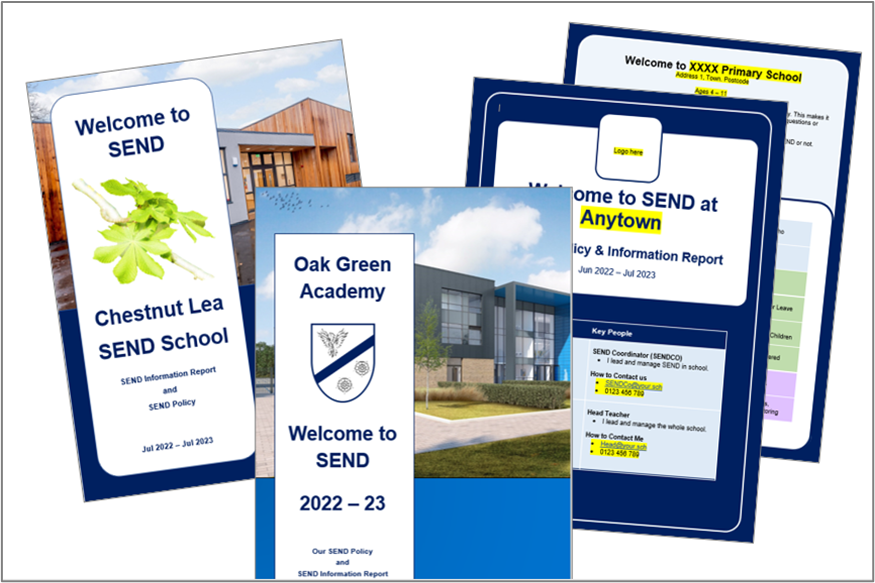
The first step to writing an outstanding SEND policy and SEN Information Report (SIR) is to decide which one you want to bin?
The two documents duplicate each other. As the SEND Code of Practice mandates what must be in a SIR, it is best to keep that (and simply add parts of your SEND policy that you want to keep). Your new document is your “Combined SEND Policy & Information Report.”
Whether that idea makes you excited or leaves you cold, read on…
Five tips to writing an inclusive SEN information report
- Combine your SEND Information Report and SEND Policy.
- Use pictures (to engage readers).
- Write in plain English (i.e. with a high level of readability).
- Use a clear font.
- Adopt good habits.
1. Why combine the SEN information report and SEND policy?
It benefits the people who need to read about SEND at your school (e.g. parents, staff). It pulls more of your SEND information into one place and, as the SENCo is now doing one document (rather than two), they can spend more time making it clear to read. This helps whether the reader is a new staff member, a parent who has literacy difficulties, or a parent who speaks English as an additional language.
Are we allowed to combine our SEN Information Report and SEND Policy?
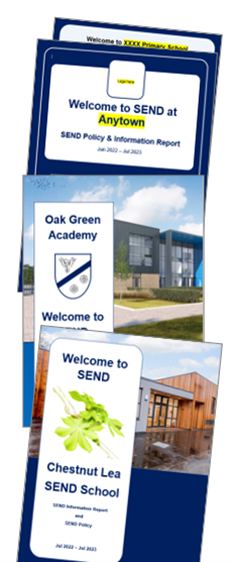
Yes. The DfE say this is OK.
Separately, The Key, a well-trusted source, also asked the DfE. In an article How to review your SEN policy and information report (firewall), the Key report that:
- “The (SEN Information Report) can be included in your SEN policy, or presented as a separate document.”
- “The SEND policy does not have to be published as a separate stand-alone document.”
If you need a document for colleagues to prove that combining these documents is allowed, click to download “Is it OK?” (an A4 briefing). This download also includes Ofsted’s response to questions on this topic.
Quick Tip: Use ‘SEND’
When you first use the term ‘Special Educational Needs or Disabilities’ add ‘(SEND)’ afterwards. After that, just use ‘SEND’ as it is quicker to read.
2. Use pictures in your SEN information report
Pictures break up text and give the reader a momentary rest. Whether it shows your school’s size (via satellite image) or a simple fiddle toy, pictures quickly convey information.
Also, pictures signal your values. For example, a photo of happy children playing Shark Top Trumps can help to signal that social skill development is part of your SEND provision.
Both smiling pupils and great white sharks keep people reading.
It is hard to include images of SEND pupils. After all, the SEND status of a child is private. So, include this statement early in your document:
“Our photos of pupils are chosen regardless of whether they have SEND or not. This is inclusion.”
This allows you to use photos of pupils from your website or prospectus.
Alternatively, Pixabay offers thousands of free images, and you can use them without copyright worries. Their photos and illustrations, once added to your work, catch the eye and quickly convey the page topic to your reader.

One excellent contributor is Peggy_Marco who provides simple bubble illustrations as well as photos and AI generated images.

If you need more choice, then unsplash.com also offer copyright free pictures.
3. Make your SEND information report easily readable
The Flesch reading ease score is a way to find out if you have written in plain English. It is free to use and is even built into in Microsoft Word – you just have to click the right buttons to discover it.
The Flesch reading ease score is a mathematical formula that scores text out of 100, where 100 is easiest to read. Here’s a few examples of Flesch scores:
- 100 = Cat in the Hat
- 90+ = Fantastic Mr Fox
- 80+ = Boy by Roald Dahl
- 70+ = A Barack Obama speech
- 60+ = A typical BBC news website story
- 50 = Stephen Hawking’s Brief History of Time (first 2500 words)
- 30 = Academic paper on the transmissibility of a new COVID variant
When writing anything for parents, aim for a score of over 60 because this is considered plain English.
You can check your score using tools that are already built into Microsoft Word. Google ‘How to use Flesch in Word.’
Alternatively, paste your text into the Hemmingway app for free tips on how to make it more readable.
4. Use a Clear Font
It takes longer to read fancy fonts. So, always choose a sans serif font, size 11 or 12, with 1.2x line spacing.
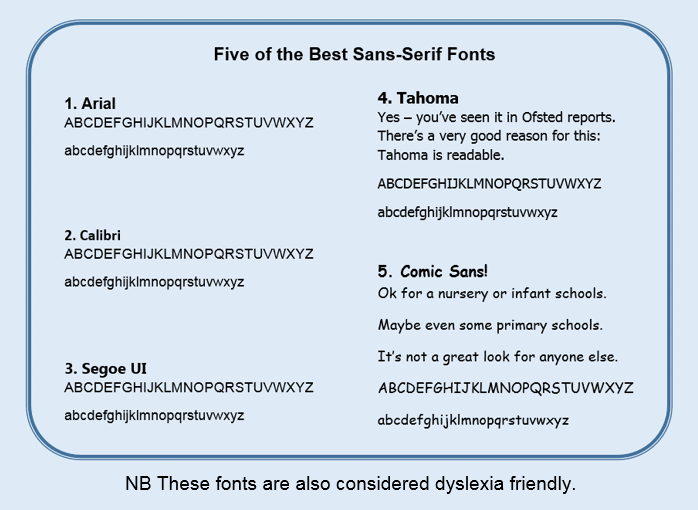
Cursive Fonts in documents for parents
Cursive fonts (i.e. handwriting fonts) are more common in primary school policies. Avoid them in your SEN Information Report as they are harder to read and slow down you reader.

Find more advice on writing for people who have visual impairments or dyslexia here.
5. Pick up good habits
Once you’ve been told what inclusive writing includes, some of it is incredibly easy to adopt. Our four page guide to writing accessible SEND Policies / SIRs has information that will help you adopt new habits in your writing.
- How many words in a perfect sentence?
- When are there too many bullet points?
- Simple substitutes for your jargon
- White Space
- Tautology and saying things twice
- Active sentences
What do other SEND experts say?
Adam Boddison was the highly respected chief executive of NASEN. His view is that best practice goes beyond the basic requirements and ensures that the reports are as accessible and impactful as possible. He added that the requirements of the SEND Code of Practice are the minimum expectation. His book on SEND for school governors is excellent.
Andre Imich was a leading SEND expert at the DfE. On SEND information reports, he asks “Do they convey a welcoming message? This is about celebrating the good work of a school. Do they do that enough?” (26:30 onwards). He added that most of the ones that he’d seen were just words and that parents do value photographs. He adds “What would be helpful would be colour and pictures and that there are ways of making them very attractive.”
Margaret Mulholland (ASCL SEND Lead) and Natalie Packer (SEND expert) also comment on this 2024 Schools Week article on the subject. The article also contains stark comparisons between SEN information reports and a Stephen Hawking’s book on cosmology.
The next steps for your SEN information report
If SENCos follow the above advice, many more of families and staff will keep turning the page of their school’s SEN information report. Better informed parents and staff can help pupils with SEND to better achieve, belong and thrive.
At worst, the world is a little fairer.
At best, pupils achieve even better outcomes.
This is a win-win.
This article gives you free advice on how to do even better. If after reading it, you want further support or training for your school, trust or LA, get in touch.
We can help you to develop an awesome SEN information report.
You may also be interested in…
Image credits: 9000 Lives with photos of schools (title); Pixabay / 9000 Lives (body text).
Need help with SEND in your council, trust or school?
As well as SEND advice, we write inclusive and accessible policies for organisations like yours.
Check out our feedback or get in touch.
Keep up to date with inclusion from 9000 Lives
- BlueSky @9000lives.org
- LinkedIn Aaron-King-Inclusion
